Let your workflow
keep up with your life.

Expedite your entire Lightroom editing workflow, with productivity tools designed by photographers, for photographers

Expedit learns how you edit in Lightroom Classic and does the predictable work when you ask it to: culling, first-pass edits, whole-shoot corrections, and batch jobs like denoising or hiding faces. One click, and the boring 90% of a batch is done. Entirely on your Mac.

Works offline  ·  One-time purchase  ·  You own your model
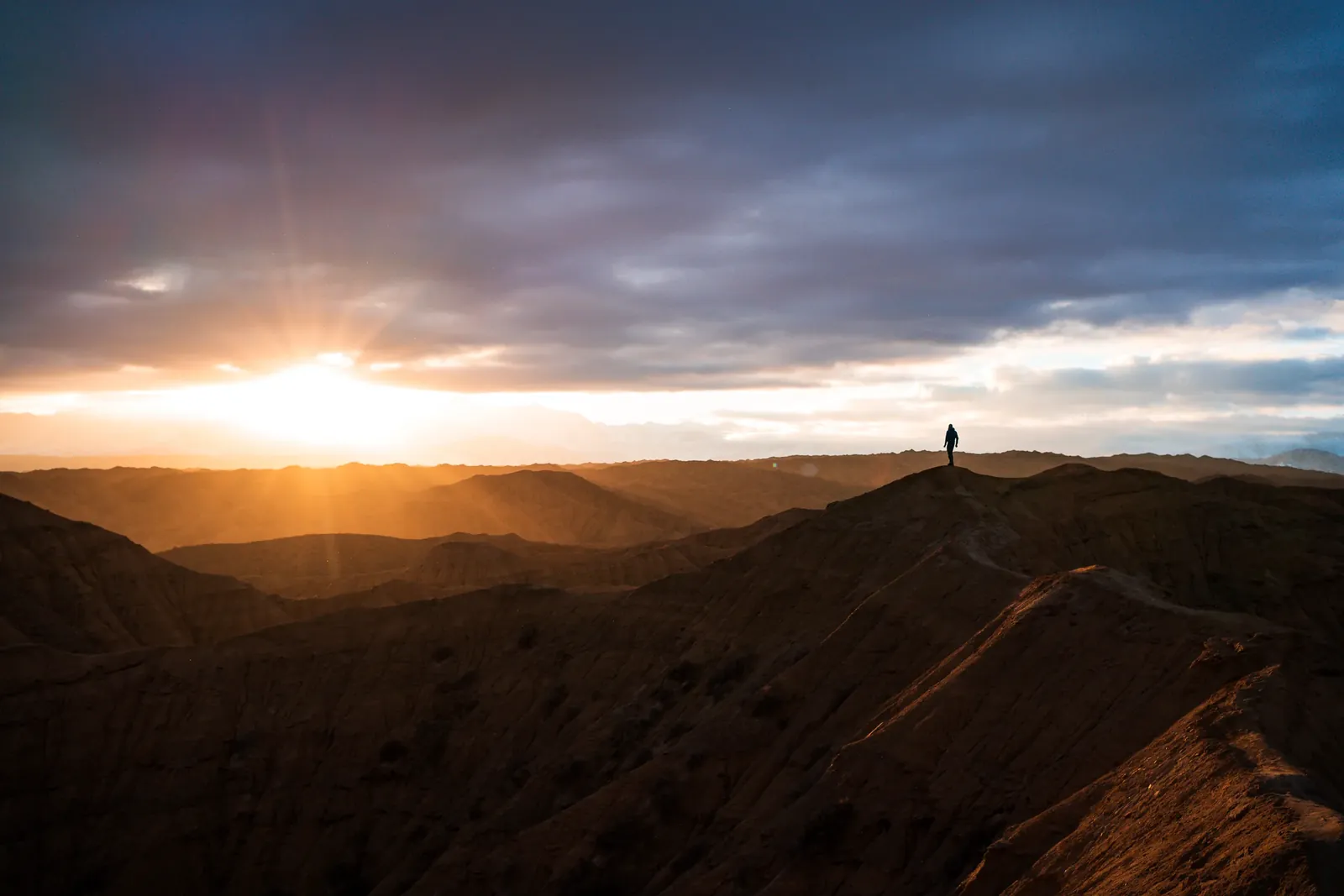
Photo with Expedit's predicted edit applied
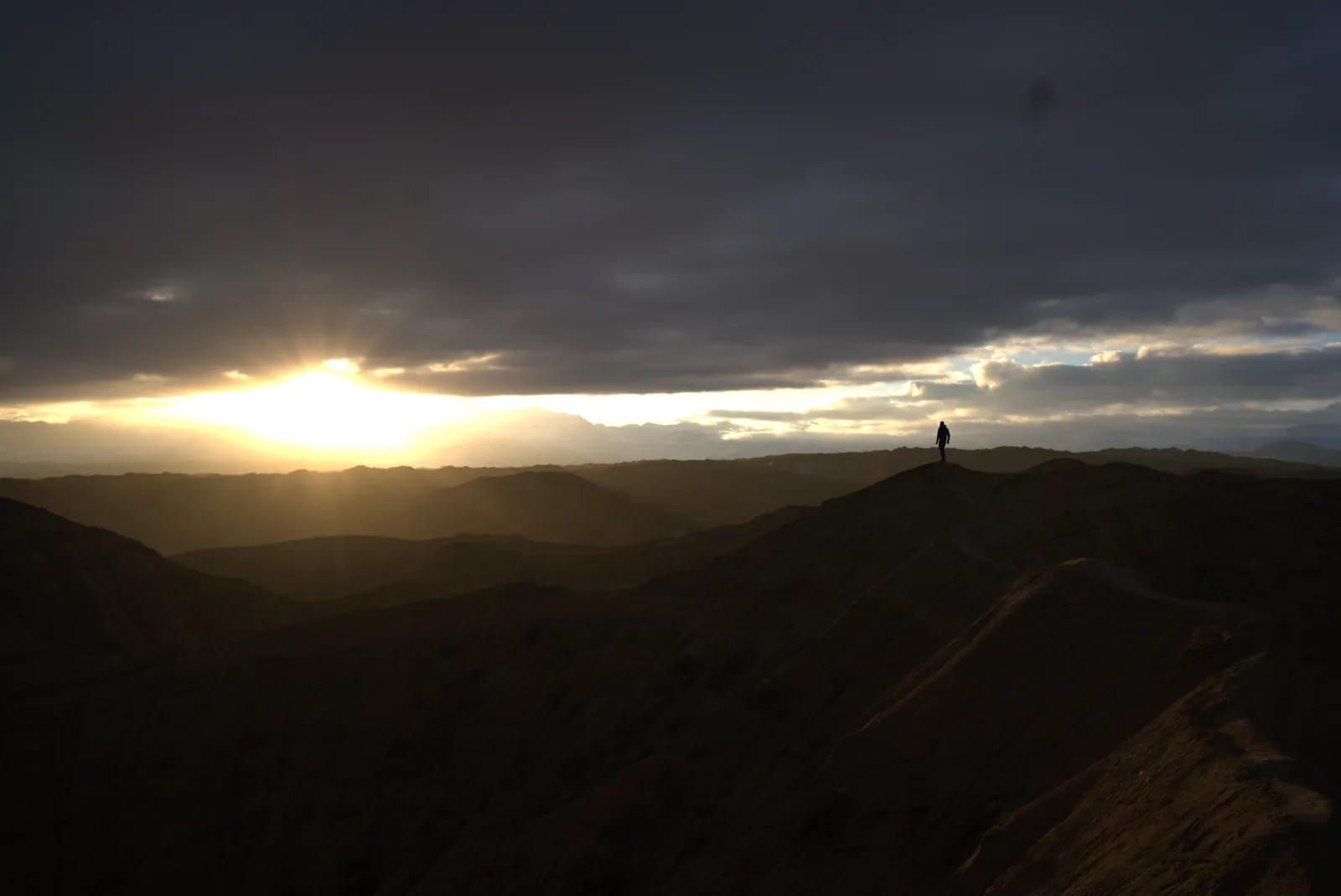
The same photo, unedited RAW

Actual Expedit predictions from photographer Ryan M, edits based on his personal editing style. Drag to compare.

Life doesn't wait for you to finish editing.

Expedit handles the repetitive, predictable 90% of editing, so your time goes into the creative 10% that's actually yours.

You shoot often. Every trip, job, and shoot adds thousands of photos to your catalog. Culling, selecting and backing up already eat into your time, and the video edits are piling up too. Then there's the 9 to 5, the next trip already on the horizon, and a social life to maintain. Unfortunately, life doesn't wait for you to finish editing.

You have a style. Across scenes and locations, you make the same recognisable moves, and those moves can be predicted. Expedit studies how you've edited, then applies that to any batch you point it at, from one photo to ten thousand.

One model.
Every condition.

Expedit reads your Lightroom history to learn exactly how you edit across different conditions. It's not a preset. It's your specific style, responding to each photo.* It doesn't need a lifetime of history: training starts working at around 500 edited RAW photos and hits its stride from about 2,500, whether they span two years or ten. If your style has moved on, it can train on just your recent edits.

STEP 01
Read your catalog

Expedit parses your Lightroom history: every develop setting, on every photo, going back as far as you have history. Read-only, so it can't touch your catalog.

STEP 02
Learn your pattern

It pairs your edits with each photo's histogram, camera, lens, time of day, and visual content, learning what you do when a photo looks like that.

STEP 03
Start from your look

Run it on a batch and your edits are applied directly in Lightroom, as normal, undoable develop steps. You fine-tune instead of starting from zero.

Prediction has a ceiling: your intent.

How predictable your editing is isn't a matter of marketing. It's measurable, on your own catalog, before you trust a single prediction.

01 · The truth

The same photo can deserve two different edits. It depends on the day: sometimes you wanted it warm and golden, sometimes cool and quiet. That choice lives in your head, not in the pixels, so no software can fully predict it. Not theirs, not ours. Any tool that promises otherwise is guessing on your behalf.

02 · So we measure it

So Expedit is honest about it. While learning your style, it works out:

  • which edits it can predict reliably
  • which depend on the mood of the shoot
  • which are calls only you can make

It tells you plainly what to expect from each slider, instead of a magic score.

03 · And give you the power to control it

And if the predictions land differently from what you actually wanted, edit a few photos the way you want them, click Sync Corrections, and the rest of the batch follows. What no software could have guessed becomes a few-second instruction, done on your Mac, in the same editing session, without sending your data away.

Correct two photos.
One click syncs the rest.

No model can read your mind about the mood of a shoot: golden-hour warmth one day, cool restraint the next. So Expedit doesn't guess. It learns from how you correct.

Adjust a photo or two from a shoot, then run Sync Corrections. Expedit learns that shoot's direction and carries your adjustment across the rest of it, as normal, undoable Lightroom history steps. The photos you corrected stay exactly as you left them, and you see every change before it lands.

Your corrections stop being rework. They become instructions.

You nudge a photo or two
Warm the white balance, lift the shadows, edit like you always do. Nothing to configure.
One click: Sync Corrections
Select the batch and run Sync Corrections. Expedit reads your changes and takes the hint: this whole shoot wants to be a little warmer, or brighter.
The rest of the shoot syncs
Photos you haven't touched update to match. Each one is an undoable history step, and the photos you corrected stay as you left them.

See the hours
you get back.

Expedit keeps score on your own photos. The time it saved you, how many photos needed no changes, and how much of the slider work it did sit together on one page, month by month, with a summary in the menu bar. It's counted conservatively: anything you changed afterwards is your work, not ours.

Prediction Performance
Time saved
Measured on your photos since 18 April 2026
2.6hours
of your 4.3 hours of editing, done by Expedit (61%)
Last 30 days · all time: 9.0 of 15.5 hours (58%)
Photos edited
1,414
filled in by Expedit
Untouched
472
needed no changes
Adjustments
1,876
made for you
Your fixes
1,185
changes you made
Expedit did 61% of the slider work
ExpeditYou
By month
1.0hMay
1.6hJun
30mJul
2.5hAug
1.3hSep
1.9hOct
How this is counted: each setting Expedit moved away from neutral and you kept is one adjustment you didn't make, at 5 seconds each. A setting with the same value across a folder counts once, as if you'd synced it. Your hours of editing are Expedit's adjustments plus your own changes, counted the same way, on the photos Expedit filled in.
In the menu bar
MODEL LEARNINGLightroom
my-styleupdated 6d ago
Watching for edits, corrections improve your model
89%settings kept
12corrections
30new edits
Expedit did 2.6 of your 4.3 hours of editing (61%)Last 30 days · all time: 9.0 of 15.5 hours (58%)
Last checked 2m ago
Open Dashboard…

Shown with real numbers from one photographer's library in October 2026. Yours are measured on your own photos, on your Mac.

The jobs you'd do one photo at a time.
Done in one click.

Predicting your edits is where Expedit starts, not where it stops. It also takes on the chores that quietly eat an evening: hiding strangers before you post, denoising a whole night shoot, putting the profile you always end up choosing on an entire trip. Select the photos, pick a Batch tool from Lightroom's own menu, and go and do something else. You never have to leave Lightroom.

NewBatch: Censor Faces

Hide the faces.
Keep the RAW.

Posting a street scene, a crowded trail, or someone who never asked to be online? Expedit finds the faces in every selected photo and groups them by person, so hiding one stranger across forty frames is a single tick, and keeping your travel partner is another.

  • You never leave Lightroom. Select the photos, choose Batch: Censor Faces, tick who to hide. The censored copies land in your catalog, ready to edit. No exporting, no round trip through another app.
  • Pixelated inside the RAW data itself. The censored copy edits exactly like the original: same sliders, same headroom, same look.
  • Your original is never touched. The copy is saved next to it as a DNG and stacked with it in Lightroom.
  • Nothing left behind. Previews tucked inside the file are cleaned too, and names you gave people stay out of the copy.
  • Private by design. Finding and hiding faces happens entirely on your Mac.****
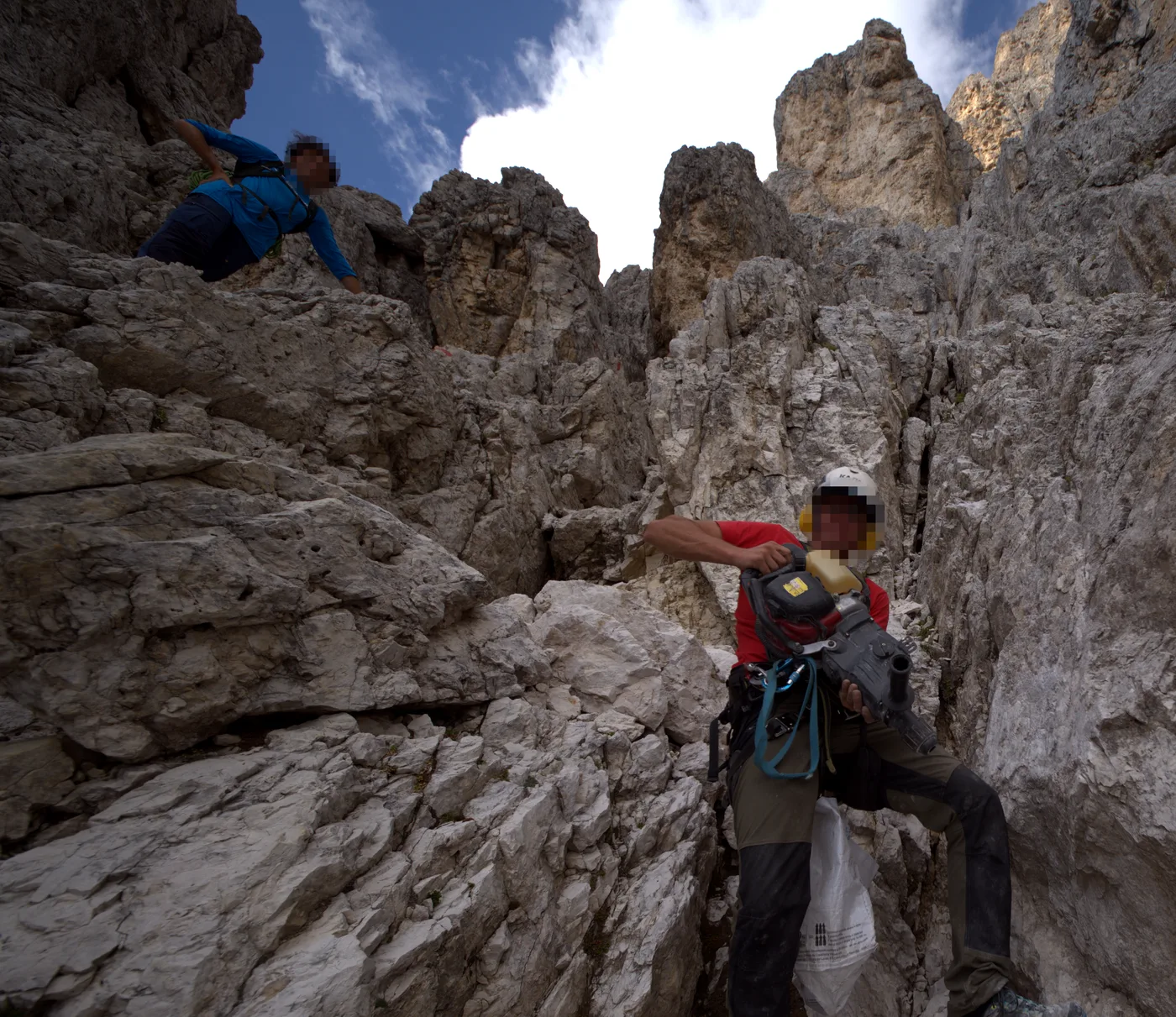
Two climbers in the Dolomites with their faces pixelated by Expedit
Person 2
Person 1
RAWRM107734-Censored.dng

Batch: Apply AI Denoise

A whole night shoot,
denoised unattended.

Set a strength for each ISO once and Expedit remembers it. It runs Lightroom's own AI Denoise in steady rounds of up to 100 photos, shows how long is left, skips frames you've already denoised, and picks up where it left off when you run it again.

Batch: Apply Camera Profile

Your usual profile,
on every photo.

Expedit knows which camera profile you end up choosing for each camera. One click puts it on a whole import, and only the profile changes: every slider stays exactly where it was. Or tick it in the Apply dialog and it comes along with your predictions.

You never leave LightroomEvery tool runs from Lightroom's own menu: Library ▸ Plug-in Extras
Runs on your MacNo uploads, no per-photo fees, no waiting on a server.
IncludedEvery batch tool comes with the one-time price.

Built so you don't have to think about it.

One-time setup. Then it just works.

Shoot Sync

Correct a couple of photos and one click carries it across the whole shoot. You see every change before it lands.

Effortless culling

One click sorts a fresh import: it groups bursts into takes, puts the sharpest frame of each forward, and ranks them by what you usually keep.** You make the final calls, and it never deletes anything.

Trains while you're not looking

It retrains in the background at a quiet moment, then sits an exam: a new model only replaces yours if it beats it on your own photos. You get the final say, and every update is reversible.

Honest expectations

It measures how predictable your editing really is, then tells you what to expect. No promises of magic.

Guardrails, everywhere

Predictions stay inside the slider ranges you actually use, and your catalog is opened read-only.***

Native, local, quiet

A menu bar app built for Apple Silicon. No browser tabs, no uploads, no waiting on someone else's servers.

Re-run without redoing

Run it on a folder again and tick a box to skip the photos it has already edited, or the ones you've edited yourself.

Moves with your taste

Your style isn't frozen. If it has moved on, train on just your recent edits and the model follows you there, instead of averaging everything you've ever done.

The only one that's fully yours.

Expedit is the only editing prediction software where your photos never leave your Mac, even for training. Others can edit offline once your style is built, but building it means uploading your photos to their servers first. Expedit trains and edits entirely on your machine, with no subscription. When a style profile lives on someone else's servers, every new shoot has to be uploaded through them, and every photo becomes chargeable. Expedit hands you the model instead.

Expedit Other Predictive Editors
Your photos Never leave your Mac. Edit on a plane, in the field, anywhere Uploaded to servers you don't control
Training your style Runs on your Mac. Nothing uploads, not even to build the model Your edited photos upload to their servers to build it, even for the ones that edit offline afterwards
Your style Lives on your Mac, not in someone's cloud. No account sits between you and your own style Tied to your subscription, often training their models too
A new shoot Edits computed on your Mac, straight into Lightroom. No upload, no queue, no meter Every shoot uploads to their servers, gets edited there, and bills per photo
Model updates Trained on your Mac. Only installed after beating your current model on your own edits, and always reversible Means sending your data away again. Swapped silently on their side, so your results change without warning
Cost over time $99 once. Unlimited photos, forever, with no per-image credits Monthly fees, price rises, billable usage
Longevity Runs as long as your Mac does Works only while the company and your subscription do
What a year of editing costs
One-time
$99
Expedit
Paid once. Every year after that costs nothing
Per year, every year
$360+
Subscription editors
$30 to $45 a month, every year you edit
Per year, every year
$1,500
Per-photo services
At $0.05 a photo, 30,000 photos a year

You own your model. No meter, no upload, no subscription: one photo or ten thousand, online or off, in your style, forever.

No subscriptions.
No ongoing costs.

Your editing tools shouldn't bill you monthly for your own style. Expedit follows one principle: you buy it, you own it. The app, the model it learns, and every photo it touches stay yours.

There's no per-photo meter, because there's no server in the middle. A ten-frame test and a five-thousand-photo season cost exactly the same: nothing extra.

And if it isn't learning your style, you don't pay at all: every purchase comes with a 14-day money-back guarantee, long enough to train it and run a real shoot.

$99
One-time purchase

Full access to Expedit for Lightroom Classic, on one Mac at a time.

  • Unlimited photos, unlimited training
  • Every batch tool, including Censor Faces
  • All future updates included
  • Email support

We'll ask you to confirm by email first. Launch news only, and you can leave any time. Privacy

14-day money-back guarantee. How refunds work

Expedit needs Lightroom Classic on your Mac, not the cloud-based Lightroom app. It learns from your RAW edits and edits RAW files (any camera brand, including DNG). If your library is mostly JPEGs, it won't have enough to learn from. Check before you buy. See full requirements

Corporate or enterprise customer?

What you need

Expedit runs on your Mac and learns from edits you have already made in Lightroom Classic. Here is what it needs, so you can check before you buy.

A Mac with Apple Silicon

M1 or later, running macOS 14 Sonoma or later. Intel Macs are not supported.

Lightroom Classic

Not the cloud-based Lightroom app. The plugin needs Lightroom Classic 10 or later, and the AI Denoise batch tool needs Lightroom Classic 12.3 or later.

RAW photos you have already edited

It learns from your RAW edits in Lightroom Classic, from any camera brand, including DNG. JPEGs are not used for learning, so a library that is mostly JPEG won't give it enough to go on.

Enough edits to learn from

It works well from around 500 edited RAW photos and hits its stride from about 2,500.

Everything stays on your Mac

Training and editing both run on your Mac, and your photos never leave it.

An internet connection, now and then

You need one to sign in, and for a quick license check about once a week. It keeps working offline for about a month.

Expedit
The boring 90%,
done in one click.

Let your workflow keep up with your life, starting with your very next import.

Get Expedit for Mac Recommended workflows →
macOS · Apple Silicon · Lightroom Classic · RAW files (any camera, incl. DNG) · Trains from around 500 edited photos
* Expedit can learn from your entire history, or from a custom selection, so if your style has changed over the years, predictions reflect how you edit now, not how you edited a decade ago.
** Culling learns which shots you keep from the photos you've rated highly or exported. Picks and alternates are marked for your review (with stars, by default); everything it sets aside stays in your catalog. Expedit never deletes anything.
*** Safety & scope: your catalog is opened read-only, making database corruption technically impossible; all edits are applied through official Adobe Lightroom integrations as normal, undoable steps. Expedit does not predict crops, masks, healing, or other structural edits.
**** Censor Faces finds clearly visible faces; faces turned away, covered, or very small may need your own eye. It writes a new file, name-Censored.dng, next to the original and adds it to your catalog through Lightroom; the original file is never modified.